Mac XP: ordering new stuff

Price quote Mac Pro

As I already told you about in my previous blogentry, I need to replace my iMac 2 Gb with something heftier.

So the solution is to get a new Mac that allows me a lot more RAM and a number of internal fast diskchannels. If I can place the Parallels images on one or two secondary disks, leaving just the OSX on my primary, I think I can avoid having the system thrash. There’s only one model that can do all this and that’s the Mac Pro. (Yes, I know recent iMacs can take 4 Gb of RAM but that’s not really enough. The single disk limitation also remains.)

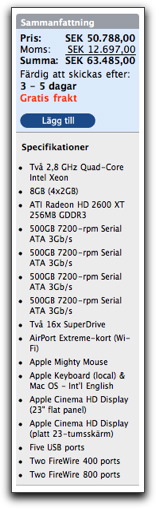
So I went to the Swedish Apple store and configured up one, looked at the sticker and broke out in a sweat. With 4 x 500 Gb drives and 8 Gb of RAM and 2 x 23 inch monitors, I’m out around 50800 SEK, before VAT. Ouch.

There has to be another way. Especially that RAM seems ridiculously expensive. So the first item on the agenda is to find cheaper RAM, and while I’m at it, drives.

Surfing around, looking for good and bad experiences in the newsgroups, I came to the conclusion that Other World Computing (OWC) had a pretty good rep. Checking out their site I noticed they weren’t averse to international shipping. Some people in newsgroups recommended using Fedex, since UPS has a bad habit of crushing boxes, it seems. So Fedex it’ll be.

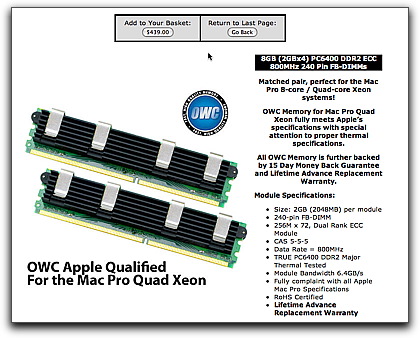
The Mac Pro, latest version, uses memory with pretty special cooling requirements and if you don’t want the fans in the tower to spin too fast and make howling noises, you’d better get memory with these extra large fins.

Mac Pro memory OWC

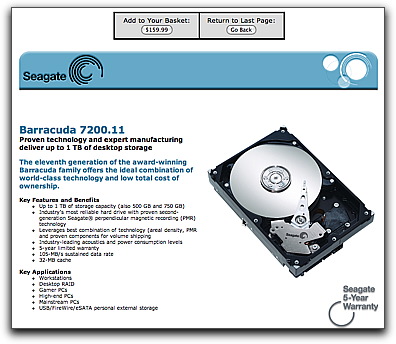
For the drives, I chose the Seagates, since according to spec they’re the least noisy.

Seagate 500 Gb drives OWC

Add to that Fedex shipping and the total is:

Total price OWC

Not bad, not bad at all. The price for the Mac Pro with minimum RAM (2 Gb) and one 320 Gb drive is still 34500 SEK without VAT or thereabouts. What more can be done?

Well, I’m a developer, and Apple is kind to developers, so I checked out the ADC Select membership and ordered it:

ADC Select membership

Except for DVDs with developer tools, access to a lot of training, extra technical developer support and stuff, you also get a reduction on one hardware purchase per year and, not least, a t-shirt. That t-shirt clinched it.

With the ADC Select reduction applied, the Mac Pro without the extra RAM and disks came to 28885 SEK. Now we’re talking. Which means that the ADC Select reduction exceeds the price of ADC Select itself. The only requirement is that you don’t sell the hardware within a year and that you use it for development for the Apple platform, which is exactly what I do. I suspect that I even get access to OSX Server this way, except I haven’t really located it yet.

None of all this has arrived yet, but various status reports and phonecalls back and forth indicate that today may be the day for both shipments.

As always, stay tuned for further developments.

Developing on Mac XP

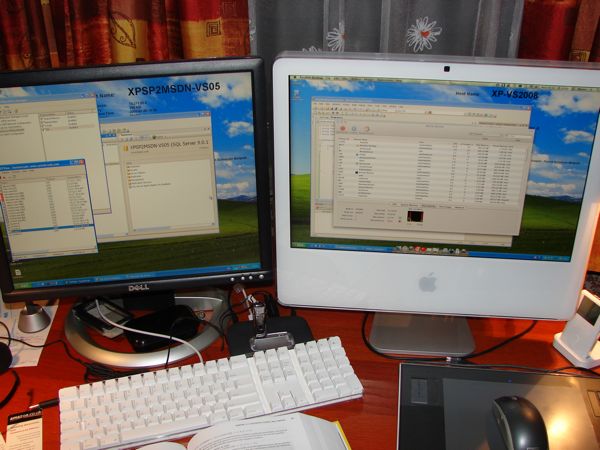
Way back, I developed under Windows, starting from nothing (v 1.03) and going all the way up to XP. Then I drifted into OSX. Recently I drifted back, but not all the way. Currently I’m developing for Windows XP on my iMac, and this is how it looks:

Photo of iMac running XP

As you can see, I’m running two instances of XP, the one on the left has Visual Studio 2005, a full SQL Server developer’s edition, while the one on the right has Visual Studio 2008. That one connects to the SQL server over a faked internal net in the 10.x.x.x A-class. Note that the Dell monitor to the left is connected to the iMac and displays an extended desktop.

Both XPs run under Parallels desktop for Mac, both run in “full screen”, which means they’ll take the full monitor they happen to be on when you go to full screen. Working this way is just like two separate XP machines, except I only need to use one keyboard and mouse. Pretty darn neat. Naturally, you need at least two full XP licenses to do that, but go get an MSDN Pro or MSDN Operating Systems subscription and you’ve got more than enough licenses for this.

For a full screen shot of the two XPs side to side, click this link. (The Dell monitor has lower resolution, which explains why the left XP image is a little bit smaller than the right one.)

When I travel to a customer’s site, I copy over the files for an XP instance to my portable, a MacBook, and when I get back I copy it all back. For instance, I went to a customer site, had them install and set up an SQL database on the XP on my MacBook, came back to my office, copied it back and now the XP running on my iMac has that database installed and set up. It’s the same XP instance. No need for reactivation or anything, XP doesn’t notice the move.

Even more interesting is that I don’t even need to shut down and boot XP. I can leave it open in Visual Studio, for instance, on the iMac, close Parallels, move the files to the MacBook, start Parallels, and I’m still in Visual Studio in XP, right in mid-keystroke, so to speak.

But, there’s a problem.

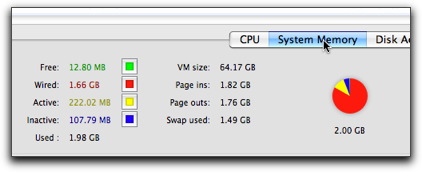
Both my iMac and my MacBook are dual core Intels and both have 2 Gb RAM, max for these models. If I run two XPs on the iMac, the memory allocation looks like this:

Activity monitor showing memory use

Now, that’s a whole bunch of read paint. And most of the rest is yellow. The two XP instances have 512 and 768 Mb RAM allocated through Parallels, which isn’t all that much for XP, but it is really more than can be handled in 2 Gb of RAM. As long as I do nothing else on the iMac, I can work comfortably this way, but as soon as I try to run NeoOffice or Firefox, for instance, things get real slow. The machine starts thrashing the disk and switching between programs can sometimes take minutes.

I needed a plan to get out of this situation, a plan that definitely does not involve Dell, HP, Lenovo or any of those people. Stay tuned.

Barely Audible

Audible.com is a great place for audio books. For some. That is, for residents of the USA. But for us others, it’s a real PITA and extremely irritating.

My gripes are as follows.

The selection of titles for subscribers in the USA and outside is totally different. There’s much less available to us, and the most interesting stuff, in general, is what we can’t get. I got an Audible account just to listen to those titles talked about in podcasts, only to discover I can’t get most of them.

My real gripe is that Audible isn’t up front about this. It’s mentioned nowhere that my selection is limited. The only way I found out is by counting titles in different lists while being logged in and comparing to the same lists when logged out. There’s at least a 25% difference in the number of titles available. Jeez. They could’ve told me before signing up, couldn’t they? Or they could list the titles with a flag telling me I can’t get them. The only reason to do it this way is if they want to deceive me into thinking I’m getting a fair deal, while I’m not.

So, I’m not happy with paying the full price for a substandard service. But I’m not, I’m paying more than the full price, since Audible adds sales tax on top of the advertised price, also without warning me in advance. They add another 21% VAT. Yes, I know, they have to according to EU tax laws, but it’s still not fair. According to most tax laws in EU (that they claim to follow), advertised prices should include tax, but that’s a part of these laws that Audible does not adhere to. Also, tax on books in Sweden, at least, is 6% and not 21%, so I’m getting a particularly raw deal.

Next: the frickin’ DRM. I’m using Macs and it’s fairly easy to authorize one or several iTunes for Audible. It’s not so easy to keep them authorized. For a while there, I had to keep authorizing after every boot; very annoying. I finally asked support and they told me you have to be an admin on your machine while autorizing, else it won’t stick across reboots. Jeez… and how am I supposed to know that? It’s nowhere in the instructions I can see. And, btw, this is exactly the kind of assumption that brought the Windows platform down; making life hard for users to run as non-admins.

I just got myself a Garmin GPS 660 FM, great little machine. It also has a provision for Audible books. There’s a manager app from Audible that you need to use to download and transfer books to the Garmin, since it’s all DRM’d. That app only works for Windows. The instructions say you don’t need it on the Mac, since iTunes handles it. Yeah, right, but iTunes doesn’t recognize the Garmin, and Audible books can’t be exported as plain MP3, so I’m forced to install Windows under Parallels, just to get the Audible manager app, just to connect the Garmin for that.

Only to discover that the Audible app throws up a mass of error messages that don’t mean anything and that the Garmin has a sloooowwww…. transfer speed (USB 1.0 I think), so it takes forever. (Transferring non-DRM’d files can be done by plugging the SD card from the Garmin into my SD card reader, and running at full USB 2 speed, but since the Audible files are DRM’d, I can’t do that.)

Then, when I went to cancel my account, I first looked up in the FAQ’s on Audible’s site how to do that. They pointed me to my account page where there should be a link to cancel. It wasn’t there. Then I discovered that if you went to the “contact support” page, you could select “cancel account” as subject and fill in an email body and send it out. Which I did, a long message outlining all my gripes, only to be met with “Sorry, we don’t accept account cancellations over email” after clicking “Send”. OMG, this is worse than trying to cancel a Compuserve account used to be, and that is saying a lot. The reason given was that they want to talk to me to hear what my problem with the service is so they can rectify it. Fair enough, but they could’ve told me that before letting me write that entire message.

So I called support, who cancelled my account, no questions asked. They don’t want to know what my problem was.

In conclusion, if you’re not based in the USA, this is not a good service to subscribe to. Not recommended.

Twisted keyboards

I’m often working as a GP in Sweden. The desktop computers we get are usually bog standard Dells, with all the excitement that goes with that…. not! (Think Borat.) All of them alike: boring but almost adequate. You can sit down at any one of them and start blindly typing away into the electronic patient records without a second thought. The only thing marring the experience is the intermittent but constant swearing at the software, both EHR and Windows, but it’s something that becomes a part of you. I think even the patients are getting used to it.

For some reason, and it has to be sadism, Dell makes two very similar kinds of keyboards where the only noticeable difference is the orientation of the Ins/Del/PgUp/PgDn/Home/End keypad above the arrow keys. The regular orientation is horizontal, that is two rows of three keys, right? Well, the alternative is a sicko three rows of two keys.

The IT department, naturally, has ordered a mix of these two types, just to keep things interesting. So there you are, typing away happily with the cursor skipping to all kinds of places you didn’t intend, until you discover some %#$&$# SOB moved the keys around!

I can understand that some people may want the alternate layout for their machines, but we’re talking about a large number of bog standard machines here, and users moving from one to the next all the time.

How ^%$#$(* idiotic do you have to be to do this to your users?!?

More, but in Swedish

I’ve been a bit quiet lately, but that’s here only. I’m spending most of my writing energy on a new blog over here that allows me to relieve myself of a lot of the frustrations I have about the rotten state of medical software. I’m one of the site’s “official bloggers”, whatever that means. If you can read Swedish, and if you like seeing me suffer while having to use some good, some mediocre, and some really crappy software as I see patients, I’d love it if you’d visit that blog, too.

My ongoing fight with XP

I’ve been using Windows since the ’80s. Programming for it, too. That’s been my main “thing” in IT all these years and still is, to some degree. But then, almost two years ago, I got myself a Mac, an iBook, and it’s been downhill ever since. Everything about Windows XP irritates me now. Let’s go through my current frustrations.

Continue reading “My ongoing fight with XP”

Win on a Mac mashup

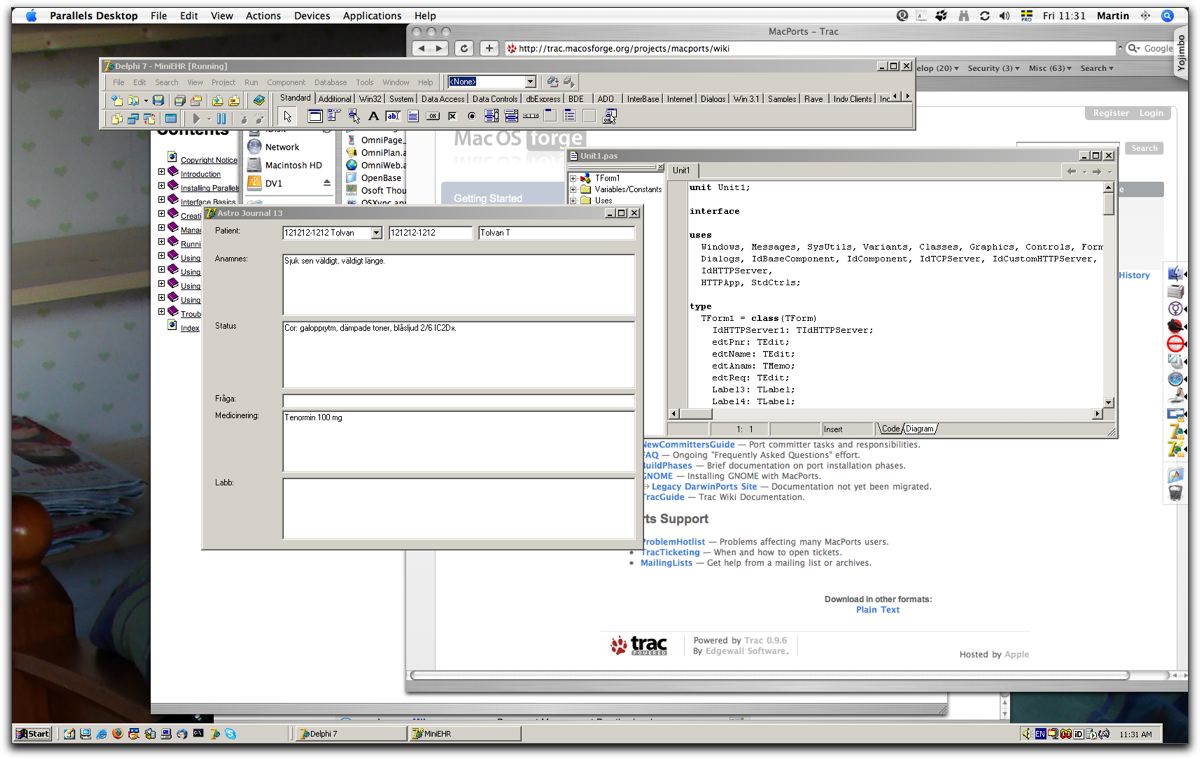
This must be one of the most schizoid desktops I’ve ever seen. Here I’m running Parallels’ most recent release of their virtual machine, build 3186, in “coherence mode”. If you look real close, or click on the image for the full size version (so you don’t destroy your eyes in the process), you’ll find the Delphi 7 development IDE and a compiled exe (Astro Journal 13) in the foreground; obviously Windows programs. You see Safari behind it, the OSX dock menu to the right and the Windows menubar at the bottom. If you look real close, you’ll even see two Delphi icons in the OSX dock. Yes, you can launch Windows apps that way, too.

This is nuts.

Desktop under Parallels Coherence

A very nice touch is that you can swap the control and command keys while in Windows, so you can use the standard shortcuts in OSX (cmd-C, cmd-X, etc) exactly the same way in Windows apps. I did discover, however, that if you’re using a non-english keyboard (I’m experimenting with learning to use a Swedish keyboard right now), you’re bound to run into differences between how Windows and OSX see that keyboard. After all, it is an Apple keyboard, and there’s no perfect mapping for that in Windows. I don’t know if one can expect Parallels to perfectly map all the language specific keyboards. On second thought, I think one can expect that.

Apple Tech Talk Overcrowded

I attended an Apple Tech talk about Leopard yesterday in Stockholm. It was interesting as such, but the most interesting thing was the lack of chairs. The first time I went to a tech talk was about a year ago and the room was half full. I then asked a couple of the people who attended, and they all said that it was about the same number as previous years, same old crowd, hardly any new faces. I found that disappointing, because Apple with OSX had already become an interesting phenomenon then.

This year, however, they didn’t have seats enough. A large part of the audience was there for the first time, as indicated by showing of hands. As far as I could estimate, the crowd was two or three times as large as the year before.

Yes, the Apple developer community is clearly growing over here, and as the speaker said, in Germany as well, where the crowding was even worse. OSX is gathering developer interest in a big way, and that’s a very good sign for long-term viability.

I like it.

AppleScript and glycemic index

I was looking up books on bokus.com, searching for books on AppleScript. One of them is “AppleScript Studio”, so I clicked on that one. At the bottom of the page, I get (in Swedish) “Other people that bought books from your click-list, also bought:”, followed by only two book recommendations:

“Everything you need to know about glycemic index” and “To get up when you’re down, selfhelp for depressive people”.

Now, this is scary. Should I persist in learning AppleScript?

Multicore vs the Programmers

The processors, Moore’s law and all that

So far, the increase in computing power has come from faster processors with increasingly complex instruction sets and longer pipelines. Some extra increase, mainly in servers, has been accomplished using multiprocessing. Fine, except the increases both in pipelines and processor speed were running into a power/heat problem. As the clock frequency goes up, the consumed power (produced heat) increases exponentially. There’s an increasingly steep wall there.

Then, more recently (last year or two?), both AMD and Intel embarked on a road of multicores, where each core is actually slower than the fastest single-core processors today. As you increase the number of cores, power consumption and heat goes up only linearly, that is parallel to the increase in computing power.

But (there’s always one), if we want the increase in computing power to continue, software that classically didn’t care, or needed to care, now needs to utilize an increasing number of cores to utilize an increased availability of computing power. Put in other words, the continued increase in computing power comes in the form of an increased number of cores, *not* anymore as an increase in power per core.

So, why should my apps care? They work just fine now, don’t they?

Yes, they do. But as everyone knows, apps steadily use more and more power just to stay useful to about the same degree they were. For instance, a typical accounting package may take 2 seconds to post a new invoice today, and took the same 2 seconds to do it five years ago, in the version that was current then on machines that were current then. Why? Because just as much as machines get more powerful, the display resolution goes up, the frameworks that the apps are built on get more sophisticated (read: slower), the apps themselves do more (the invoice is more complex today that it was five years ago), more sophisticated input devices are used today, and so on. IOW, the advancing power of the machine is consumed by the advancing needs of power of the apps, while the business advantage of using the app remains about the same.

Take your average accounting package. It’s single-threaded, I’m sure. Now, let it remain single-threaded in the future, and what happens? Well, your average desktop still gains power, doubling in power every 18 months, but now it’s chiefly done by increasing the number of cores. Each core maybe just gains 50% of power per 18 month cycle. Meanwhile, the frameworks grow even more obese, the display surface grows disgustingly, and your app becomes a kitchen sink of little features. Your single-threaded app now effectively becomes slower for each iteration. After 18 months, that one invoice takes 3 seconds to post. After another 18 months, maybe 5 seconds, and so on. Soon, you’re going to realize you’ll have to find a way to get that invoice posted using more than one core, or you’ll be history pretty soon.

Ok, I buy it, but how can I post an invoice using multiple cores?

The CPU vendors have tried to make the CPU’s parallelize instruction streams with some success (the pipe-line idea) and even reorder instructions. You can only take this so far and no really new performance tricks will come from this, I’m sure. It’s exhausted. The compiler vendors have tried to create parallelizeable (what-a-word…) machine code. Very limited success. The framework people have tried. Not much came of that. This leaves us, the architects and developers to do it. And it may go like this:

To get an invoice posted, you need the line items, the customer, the customers current credit, the stock situation, etc. Classically, the line items would be entered, for each item the price and availability would be retrieved, the sums made. Then the customers credit line would be compared to the total. The invoice number would be reserved. The whole enchilada would be written to disk and then sent to the printer. For instance. It’s a very linear process and tough to parallelize.

Now, if you changed the *business* procedures and the general architecture to allow you to create invoices tentatively, like for instance:
– sum up the entered line items
– at the same time, retrieve the customer credit info
– at the same time, reserve and retrieve an invoice number
– at the same time, issue a pick list for the warehouse

Then, when the customer credit info comes back, you can:
– approve the invoice, or
– deny the invoice and have it reversed
– at the same time, issue a restocking list if the picklist was
already issued

…etc… I hope you get the idea, since I’m tiring of this example.

The gist of the above is that to construct scalable business apps using multithreading, you have to adapt both your business procedures and your high level architecture and design. It entails both distributed computing and asynchronous messaging to a very large degree, something that current business apps lack almost entirely.

Ok, I got this far, so what’s the frickin’ problem?

The problem is that having parallel, asynchronous, and distributed processes running requires both what we call “compensating transactions” and a contention-free data model. None of these are particularly simple to handle and none of them are particularly well taught or even current knowledge. On top of that, you’ll get race conditions.

“Compensating transactions” require you to design all transactions so there exists a compensating transaction for each. (An issue for another thread, some other day, if anyone would really like to hear it.)

Now, all these technologies have to be learned by a current generation of instant programmers that are taught to drag-and-drop themselves an application in zero time and have no support from their environments (computing or business) for anything multi-processing except the primitives, which have been there for ages.

On top of that, there are no tools (or exceedingly few and primitive tools) to debug and test distributed, multithreaded, and asynchronous messaging apps.

And on top of that (it’s getting to look like a real heap), bugs in distributed systems are, as I already intimated, exceedingly difficult to reproduce.

IOW, you’re shoving a raft of advanced techniques into the lap of a generation of programmers that aren’t prepared in any way to handle this stuff. So, what do you think will happen?