An ode to Juniper

I have a Juniper SSG-5 and the school I’m doing the network setup for also got one identical unit on my recommendation. I wanted to set up a fixed VPN between the two but failed miserably, so I logged a support request with Juniper on my machine, which is still in warranty but without any kind of support contract. Oh, boy, do these guys have great service.

After just a day I got an engineer connecting to my system with desktop sharing software and we together went through a number of different configurations. It wasn’t really trivial, since the first config took us nearly three hours. Then I had another question of how to implement more finegrained control over the firewall policies in one direction, but not the other, which had us online another two hours using desktop sharing. The final result was perfect and I’ve learned so much more about the details of autokey VPN tunnels.

I’m totally blown away by the level and quality of support I got for this issue from Juniper. Maybe this particular engineer was exceptionally good and persistent, but I have the impression that it is more of a rule with Juniper. When I bought the SSG-5 I thought it was a little expensive, but after this experience, I’ve totally changed my mind. The support level and quality makes it worth the price hands down.

No, I don’t have shares in Juniper, but after this experience I think I may get some.

EHR systems are liars

I’m just copying a post here I just did to a closed forum for CISSPs.

A couple of days ago, I had to create a death certificate in Cosmic, the EHR system produced by Cambio Healthcare Systems and used in many provinces of Sweden and increasingly abroad.

So, I opened up the records for the patient, created a new death certificate form and filled it in. Printed it out, since it needs to go the paper route to the IRS (in Sweden, they handle the population registry). Then, just to make sure my data matched the EHR entry I made a few days before, I opened up the form again and discovered four different entry fields had changed after I saved. Two adress fields were blanked, my “place of employment” was changed to “Summer house” (part of another field I had filled in) and finally, my telephone number I had added was blanked out. I corrected the fields and resaved, same thing happened again. Did it three times, same thing. I never signed the document, of course, instead having a secretary scan in my paper form, which was correct, and have that put in the EHR. The erroneous form remains there, but unsigned.

I pointed out this severe bug to the IT department, and the reply I just got went into some depth explaining to me what the different fields were supposed to contain, but they didn’t touch at all on the hairraising fact of changing the documents behind my back. That’s apparantly entirely ok for them.

In this scenario, I never signed, but if I had done that, nothing would have played out differently. The scary thing is that the normal workflow is to fill in a form, any form, print it out (optionally), then sign it, which flags it as signed and saves it in one operation. You never see what actually gets saved with your “signature” on it. We’ve had a number of bugs before, where dates were changed in sick leave forms, a number of crucial fields erased and so on, so this is just the last in a long series of such bugs.

This system, the largest on the Scandinavian market, uses Acrobat Reader (yes, you read that right, *Reader*) to fill in forms. So they prepare the form data in the background, launch the Reader, lock it down modally since they can’t handle the interactions right, then let you edit and save. The “save” and “signature”, even “delete” buttons are implemented *inside* the document form since they run modally. Just to give you an idea of the “leading edge technology” we’re talking about here.

The forms as such are designed by the end-user organisation, so the problem is in two parts: Cambio enables a sloppy workflow and does not respect the immutability of signed data in their application. The end-user organisation does not test new forms for problems.

So, my issues with all this are:

1. This product has passed CE approval. So where is the systems test? These problems are trivial to find before rollout. Not to mention that I, and others, have pointed these form problems out in public since at least two years. What’s the point of the CE, anyway?

2. If Cosmic is able to change the content of forms behind my back, why isn’t this recorded in a log? There is no way I can show after the fact that the form contains stuff I never wrote, even if I would be able to remember what I wrote and this has caused much consternation before with the sick leave forms. Why isn’t audit trailing of this a requirement from the user organisation or from the CE protocol?

3. Why does the system not warn me or show me the changed information during or after signature? It bloody well warns me for everything else I don’t need warnings for. A typical Windows app, if you get my drift.

4. Why doesn’t the “signature” mean anything? It’s simply a flag set in the system with no functional binding to the information. They’re in the process of rolling out smart cards now; I have one. You stick them into a slot on the keyboard to sign in, at least that’s the idea (doesn’t work, they don’t have the trusted root installed…). But that’s for Windows login. The “signature” in the EHR remains a dumb flag AFAIK.

Meanwhile, the law and regulations governing medical practice make a huge deal out of these signatures. We *have* to sign stuff in a timely fashion and can be sanctioned if we don’t. And if we do sign, we’re held to what we sign, legally, morally, ethically. Our careers can be held hostage by a stupid flag in a stupid database record, designed by an irresponsible designer, and implemented by an agile and equally uninformed coder.

My question is this: is this shitty state of affairs, this total ignorance of what the law and regulations say, this total lack of interest in quality and consistency in application design and implementation, something common to EHR systems everywhere? Is this laissez-faire attitude something you actively try to combat as security professionals if you work in the medical field, and if not, why not?

Or, provocatively, I’ve repeatedly heard on this list (it’s a while since last time) that doctors don’t respect security in EHR systems, but now my question is this: does anyone else? It seems not.

And finally, WTF is the point of the CE approval…? I’ve seen all the cynical answers, now I want a real answer somehow.

OSX, FreeRadius, Netscreen, and me

Oh, wow, this was crazy. What I needed to get done is to have a Juniper SSG-5 firewall (which runs Netscreen OS 6.2) authenticate users from the FreeRadius server that runs by default in OSX Snow Leopard server (10.6.3). And I needed the SSG-5 to differentiate depending on groups on Open Directory on the OSX. But, man, is this poorly documented… the only thing you find in the OSX documentation is how to get an accesspoint to allow users in. That’s it. Not good enough.

You can click any of the images in this post to see the screenshots full size

First, a list of documents you may need, or I may need later and don’t want to lose:

dictionary.freeradius.internal – an Apple document listing the attributes passed to FreeRadius.

A usegroup message with some useful examples

Using OSX Radius with third party devices – has some info on hunt groups

Make sure radius is running
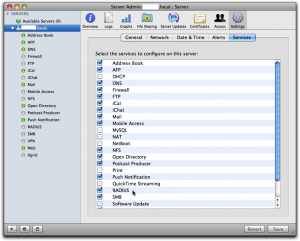
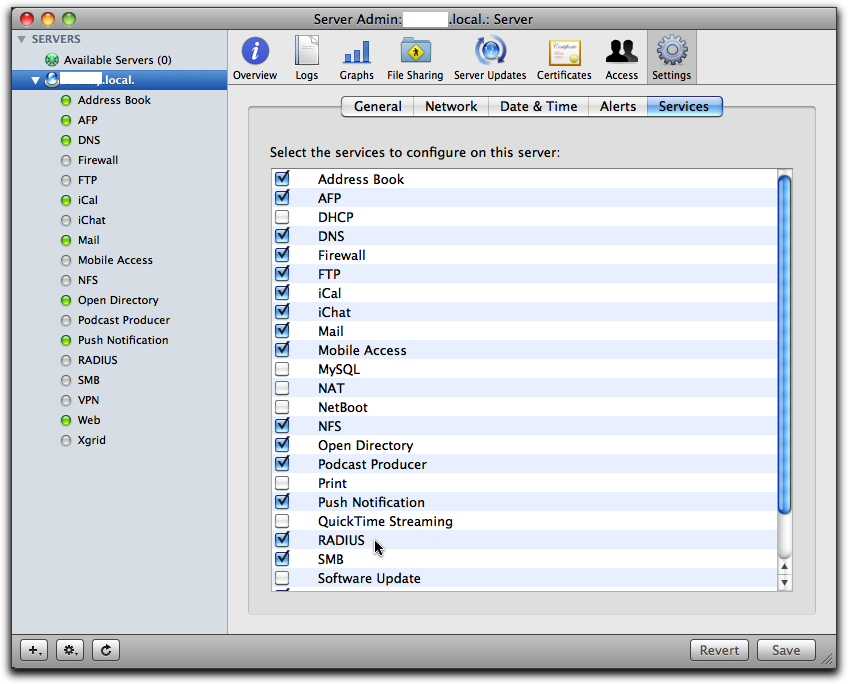
Via Server Admin, make sure Radius is selected in the services tab so it occurs in your list of services in the left pane.
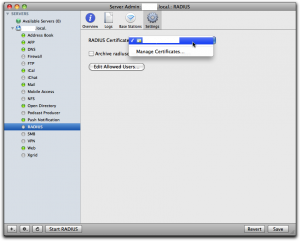
Then select “Radius” in the left panel, select “Settings” and click the dropdown for “RADIUS Certificate”. There you should either select a cert you already have installed on the server, or else select “Manage Certificates…” to go and create one. I already had one, and I had it created by CAcert, a free service for certificates of all kinds.

When you’ve got the cert sorted out, click the button “Edit Allowed Users…” and you’ll get to this screen:
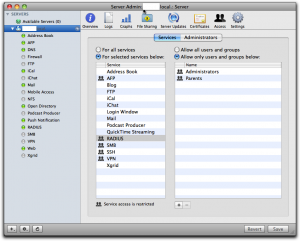
See to it that you’ve selected “For selected services below:” in the left half of the right pane and that “RADIUS” is selected in the list. Then use the plus sign below right to add all groups you want to manage through Radius. Don’t forget to click the “Save” button when you’re done.

If you have any regular wireless access points you want to add, you can do that through the Server Admin as well, but you can’t add any other devices this way.

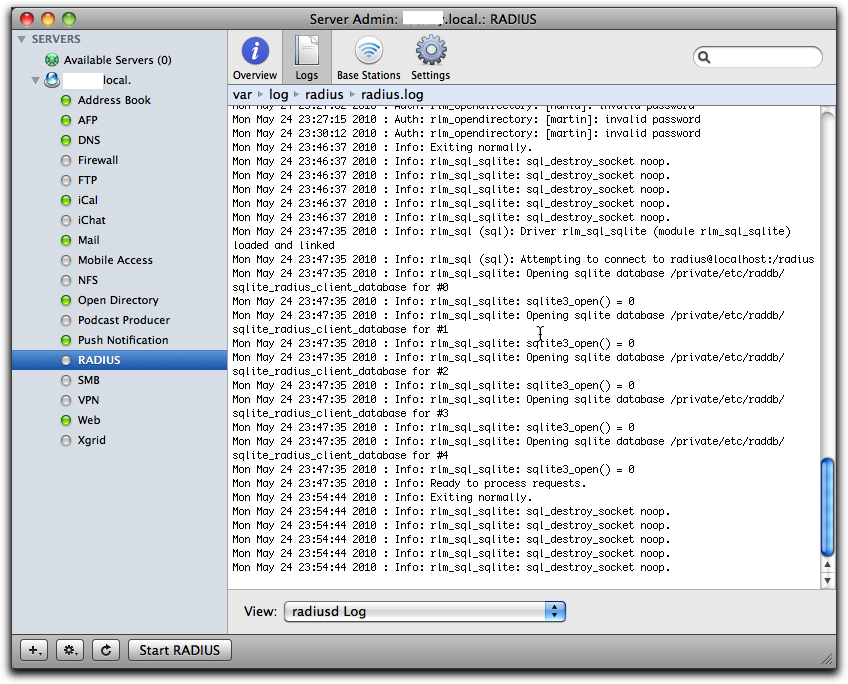
Just to see if things are more or less right, try to start the Radius server and then check the logs. You can do that by selecting RADIUS in the left panel, click the “Logs” tab on top and then play with the “Start RADIUS” and “Stop RADIUS” button at the bottom of the screen:

If it complains about the lack of any clients, don’t bother. Just leave it off, since we’ll add clients through the command line shortly.

Once you’ve played with this for a while and are satisfied that it is not too bad, you can leave the Radius server off. We’ll start it from the command line later.

It’s important to understand that all the groups you select here, and only those groups, are copied over to the user database in the Radius server. Any users that are not in one of these groups cannot ever be enabled through Radius; they’re simply not seen by the Radius server.

Also important to understand is the fact that this is as far as Apple goes in its GUI implementation of Radius. That is, any user that is enabled for Radius this way can log in to any Radius enabled wireless access points on your net. They don’t make any distinction according to user or group as to what you can do, nor do they implement anything else but wireless access points. This means that for more sophisticated usage, you have to proceed on your own, largely through the command line and config files.

Add clients to radius

A “client” is a piece of equipment that will ask the radius server to authenticate users, so clients are accesspoints, firewalls, maybe switches and routers. Each of these pieces of equipment that you want to have call the radius server needs to be configured in the server with its IP number and a shared secret (password). This shared secred is the same on both sides, so each piece has its secret shared with the radius server, but each pairing has another shared secret. If you want to add just Apple supported wireless access points, you can do that through Server Admin, but for everything else you have to do it as follows.

To add a client to the radius server, you use the radiusconfig utility on the OSX server:

sudo radiusconfig -addclient 172.16.200.241 ssg5 firewall

After you enter this command, radiusconfig will ask you for the shared secret. Remember it, because this is the same secret we will need to enter in the SSG-5 later. A side note: the last parameter is the type and I gave it as “firewall”. As far as I can see, it’s purely descriptive and you can call it “bigbrownbear” for all the difference it makes.

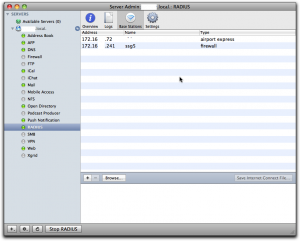
If you check the list of “Base Stations” in Server Admin, you’ll should see this client in the list, at least if Radius is running:
Add the DEFAULT entries to the users file

Even though Radius users are held in an sql-lite database under OSX, the users file still does exist and is read. In this file, we can add in rules that will be processed for any user that is accepted by Radius, so we can add on values to be returned to the Radius client (in our case, the firewall). In the users file, you also have access to some information from Open Directory on OSX, so the users file is the place where information is transformed from OSX Open Directory to Radius clients. This is where the magic happens. We write all our rules for the magic user “DEFAULT”, which matches any user accepted by Radius. More than one rule may match a real user, and all of the matching rules will be applied.

Open the “/etc/raddb/users” file on the server with pico as root:

sudo pico /etc/raddb/users

In that file, towards the end, in among the other “DEFAULT” rules, add this one:

DEFAULT   Group-Name == "Parents"
     NS-User-Group = "majors"

What this rule does is that it checks if the user under OSX in open directory belongs to a group called “Parents” and if so it sends the NS-User-Group attribute with the value “majors” to the client, in this case our firewall. We’ll add another rule:

DEFAULT   Group-Name == "Children"
     NS-User-Group = "kids"

Note: I made the group names very different on the OSX Open Directory side (“Parents” and “Children”) and on the Radius client side (“majors” and “kids”) just to make it extra clear which group is which.

Set up authentication server on the SSG-5

Now we have to tell the SSG-5 how to find and talk to the Radius server. Log in on the SSG-5, go to “Configuration” – “Auth” – “Auth Servers” and click “New”.

Give the OSX Server a name, any name. It’s used to refer to this server when you create policies in the SSG-5 later. Enter the IP number, and select the “Auth” under “Account type”.

In the lower part, select “Radius” radio button, set the “RADIUS Port” to 1812, which is the default on the OSX FreeRadius server. Set the “RADIUS Accounting Port” to 1813, even though we don’t use accounting in this example. In the field “Shared Secret” you have to enter the same shared secret you entered while defining the SSG-5 client on the OSX Server using radiusconfig (see above). Leave the other fields unchanged and click “Save” at the bottom of the screen.

Add external groups to the SSG-5

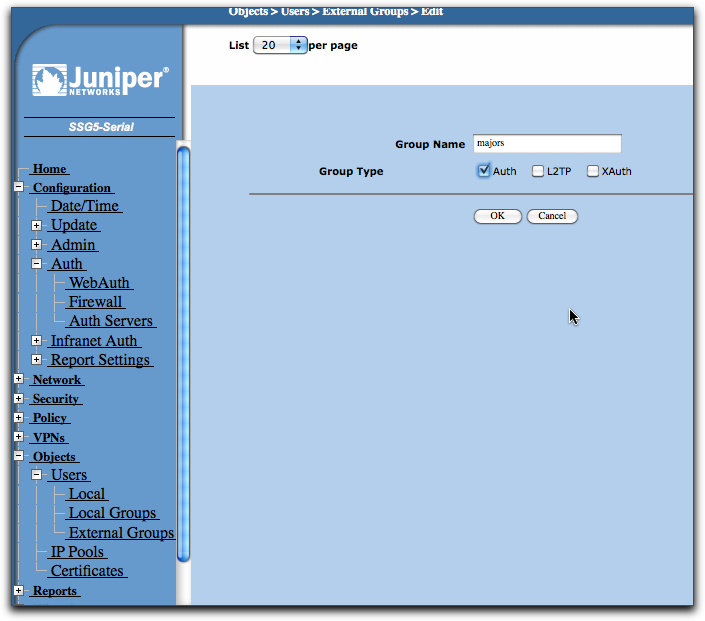
We configured the OSX FreeRadius, via the DEFAULTS in the users file, to return groups “majors” and “kids” depending on who is logging on. Now we have to set up these groups on the SSG-5 as well. Go to “Objects” – “Users” – “External Groups” and click “New”.

In “Group Name”, write “majors”, then select the “Auth” checkbox for “Group Type”. Click the Ok button, then repeat the process for the “kids” group.

Now we do a policy

Now we finally arrive at the writing of policies that make use of the groups. In this example, I’m going to limit access to the dn.se site, Sweden’s largest newspaper, and I’ll only make it accessible to OSX users that belong to the “Parents” group on OSX. To do this, I’ll first have to make a policy that by default disallows everyone from accessing dn.se, then add a policy that allow members of the external group “majors” to access it anyway (remember that the OSX group “Parents” is translated to the group “majors” in the users file, so the external group is “majors” on the SSG-5). Let’s first do the policy that disallows all access to dn.se for everyone.

Go to “Policy” – “Policies”.

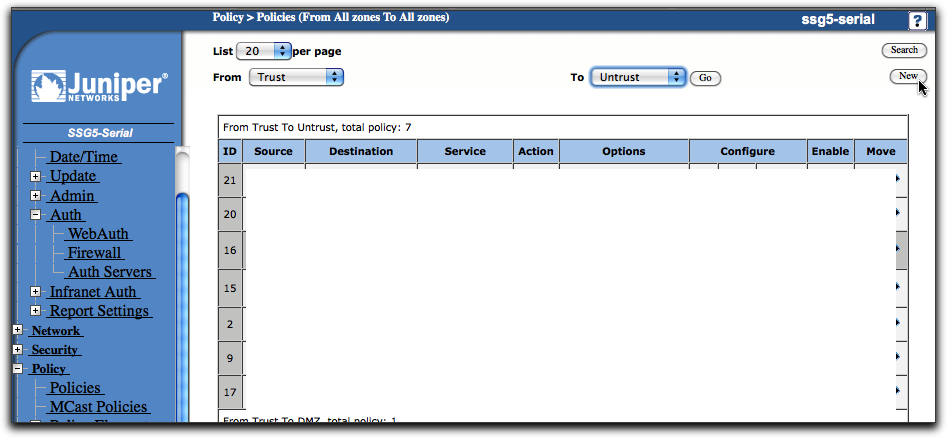
Select from “Trust” in upper left, to “Untrust” in upper right dropbox, then click “New”.
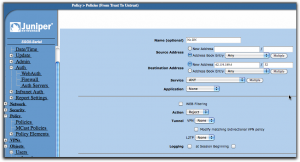
Use dig or nslookup from the command line to find the IP number for dn.se. As of the writing of this post, it was a single IP number: 62.119.189.4.

When the form opens, give the policy a reasonable name like “No DN”, leave the source address set to “Any”, but change the destination address to “62.119.189.4” and put in “32” in the mask field. The “Action” dropdown should be set to “Reject” and you can leave everything else as it was and click “Ok”.

Use the move tools in the policy list (far right) to move this policy to the top of the list. The policies are processed from top to bottom, so we want to make sure the rejection happens before any other policy may allow the connection.

Add another policy from “Trust” to “Untrust”, then fill it in as in the following screen:

Give it another name, in this case “Allow DN”. You can now select the destination address from the address book entry dropbox so you don’t have to type it in, it’s just a convenience since the SSG-5 now knows about this IP from the previous policy. The “Action” dropbox should now be set to “Permit”.

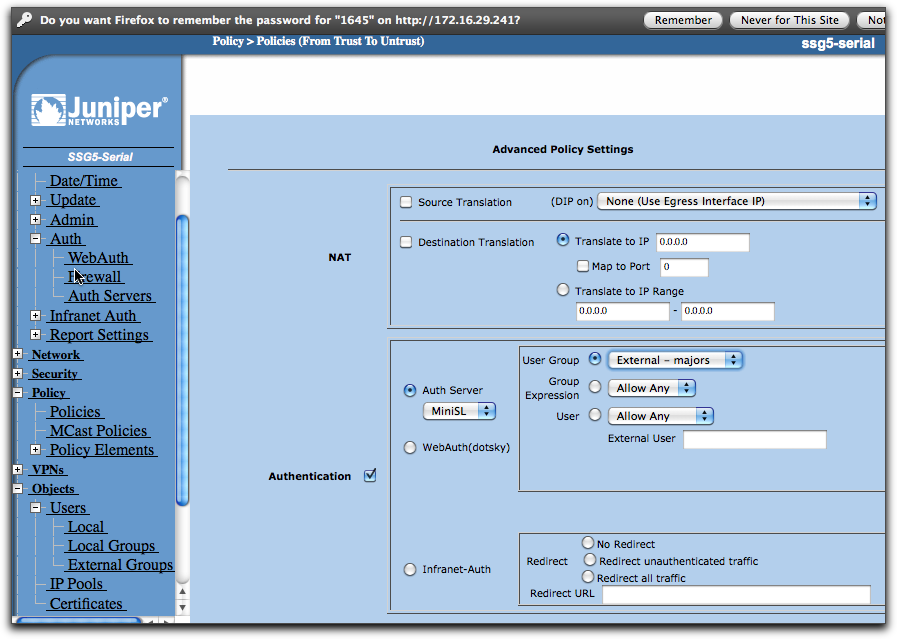
If this was all we did, we just simply nullified the previous policy, at least if we put this one above it in the policy list, and that would be pointless. Instead, click on the “Advanced” button at the bottom of the screen.
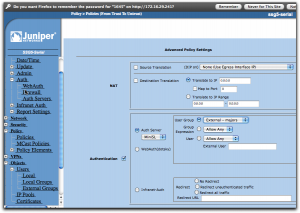
Now everything comes together. Enable “Authentication” by selecting that checkbox, then select “Auth Server” using the radio buttons. In the dropbox, select the auth server you created earlier, the MiniSL. Slightly to the right, you can select who is going to be authenticated and here you select “User Group”, then “External – majors”. If this selection isn’t available, check that you did define that external group as I described a bit earlier.

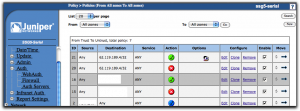
With all this done, save. In the list of policies, you should put this new policy at the top using the move tools in the last column so it ends up above the first policy we did that is set to reject connections to dn.se for everyone. The result should look like this:
Testing it all

If you started the Radius server through Server Admin, go there and stop it first. Log in to the OSX server and open a terminal shell. Start the Radius server in debug mode from here by:

sudo radiusd -X

This should get your Radius server running and you’ll see how it handles requests. Now go to a browser on any other machine on the local net and try to open dn.se. You should get a login dialog from the browser itself and if you provide a username and password from someone who is defined in the OSX Workgroup manager, is in the “Parents” group, then you should get access, else not.

I hope it works for you. If not, explore the raclient tool as well, since it’s very useful for finding configuration errors. Once it all works, stop the Radius server on the command line and go start it from Server Admin instead, so it runs as it normally would.

A little remark: if you change settings in the users file, you have to stop and start the Radius server again each time, else it won’t see the changes.

I’m planning to do a post on hunt groups as well, but I haven’t done them yet, so it could be a while.

Additional notes

You will find files with all the predefined attributes in the folder /usr/share/freeradius. Each type of equipment has its own file. The attribute names I used above come from the file “dictionary.netscreen”.

Design for updates

When designing new system architectures, you really must design for updating unless the system is totally trivial. This isn’t hard to do if you only do it systematically and from the ground up. You can tack it on afterwards, but it’s more work than it needs to be, but it’s still worth it.

I’ll describe how it’s done for a system based on a relational database. It does not matter what is above the database, even if it’s an object-relational layer, the method is still applicable.

I have a strong feeling that the problem is trivial on graph databases, since the nodes and relations themselves allow versions by their very nature. I haven’t designed using these graph databases yet, so I’m not 100% sure, though.

The reason I’m going into this now is that the iotaMed system must be designed with upgrades in mind, avoiding downtime and big bang upgrades. Just this weekend, the Cambio Cosmic system in our province (Uppsala, Sweden) is undergoing yet another traumatic upgrade involving taking the entire system offline for a couple of days. Very often it doesn’t come up on time or without serious problems after these upgrades, putting patients at risk entirely unnecessarily. The only reason these things need to happen is because of poor system design. A little forethought when building the system could have made a world of difference. The PMI communication system I built and which is used in Sweden has never (as far as I know) been taken down for upgrades, even though upgrading of both client and server systems is an easy and regular activity, and Cosmic could relatively easily have been build the same way. But it wasn’t, obviously. It’s not rocket science, exactly, just see for yourself in what follows.

The problem

The first step is to understand why the database structure is so tightly bound to the code layers, necessitating a simultaneous upgrade of the database structure and the code that accesses it. In the common and naive form, the data access layer is made up of application code outside the database itself which directly accesses tables for reads and writes. If there are several data access layer modules, all of them contain direct knowledge of table structures and all of them need to update simultaneously with the table structures. This means that if you change table structures you need to do all the following in one fell swoop, while all users are taken offline:

  1. Change table structures
  2. Run through all data and convert it with scripts
  3. Replace all application code that directly accesses table data
  4. And while you’re at it, compound the disaster by also replacing business layer code and user interface code to use new functionality added in the data access layer and database while removing old application code that won’t work anymore with the new data structures

This is what we call a “big bang” upgrade and it practically always goes wrong (that’s the “bang” part). It’s extremely hard to avoid disasters, since you have to do very detailed testing on secondary systems and you’ll never achieve full coverage of all the code or even all the little deviant data in the production database that will inevitably screw up the upgrade. And once you’re in the middle of the upgrade, you can’t back out, unless you have full downgrade scripts ready, that have been fully tested as well. The upgrade scripts, hard as they are to get right, are actually simpler than the emergency downgrade scripts, since the latter must take into consideration that the downgrade may be started from any point in the upgrade.

The result is that these upgrades are usually done without any emergency downgrade scripts. It’s like the high wire without a safety net. The only recourse is a total restore from backups, taking enormous amounts of time and leaving you shamefaced and nervous back at the spot you started after a long traumatic weekend. Since backing down is a public defeat, you’re under emotional pressure to press ahead at almost any cost, even in the face of evidence that things will probably go badly wrong, as long as there’s a chance of muddling through. Your ego is on the line.

This is no way to upgrade critical medical systems, but this is how they do it. Shudder.

The solution

The solution is to isolate the database structures from the application code. If different data access layers in application code can coexist, using each their own view of how the database is structured, while still accessing the same actual data within transactions, you can let two versions of application code stacks coexist while accessing the same data. If you can swing this, you’re free to change the database table structure without the application code in the data access layer even noticing. This implies that you can simply add a new view on the database that you need for a new version of the application, add in the new application code and start running it without removing the old application code or clients. New version clients, business layers, and data access layers run in parallel to old versions, so you can let the upgrade be slowly distributed out over the user population, allowing you to reverse the rollout at any point in time. Let it take weeks, if you wish. Or even leave some old clients there forever, if there’s a need for that.

To achieve the needed insulation, simply disallow any direct access to any tables whatsoever from application code. All accesses must be done through stored procedures or views.

SQL VIEWs where actually designed to achieve exactly this: different views on the table data, removing direct dependency of the application code on the tables, so the problem was clearly defined, known, and solved even before SQL hit the scene, so why are we even arguing this now? As an aside, I never use VIEWs, only stored procedures, since I can achieve the same effect with less constraints, but that does not detract anything from the argument that the problem was both recognized and solved ages ago.

Let’s assume you need to change the name of a table for some reason. (I never do that, I’m just taking a really radical example that ought to make your hair stand on end.) First, you edit the stored procedures that access the table to check if the old table name still exists, and if not, start using the new table name. Then you create the new table. Then you create trigger code on the old table that updates the new table with any changes. Then you use the core of that trigger code to run as a batch to transfer all the old table contents that aren’t accessed to the new table. You check a couple of times during actual use if the tables keep matching in contents. You drop the old table (or rename it if you’re chicken, and drop it later). Finally, you remove the check for the old table name in the stored procedures that access the table. Yes, this is somewhat “exciting”, but I’ve done this a number of times on critical systems and it works. And if you can do this, you can do anything.

A much simpler scenario is if you add columns to a table for a new version of your app. If the new column can safely remain invisible to the old version, just add it on the fly, using the right default values so any constraints don’t fire. Add a new stored procedure that is used for the new version of the application, implementing the parameters and functionality the new version needs. The old stored procedure won’t even know the column is there. If the new column must be set some particular way depending on old values, add a trigger for that and batch update the new column using the core of that trigger in a batch command. Again, there is absolutely no need to take down the database or even kick out users while doing all this. Once the new stored procedure is there, you can roll out new applications and have them come on line one by one, leaving old versions running undisturbed.

You can dream up almost any change in table structure, including new tables, splitting one table into two, combining and splitting columns, creating or removing dependencies between columns and tables, and I can catch all of that using a fairly simple combination of stored procedures, triggers, and the occasional user function. And all of it can be done on a live production database with very low risk (caveat: if you know what you’re doing).

To keep things easy and clean, I always use a set of stored procedures per application, where the application prefix is a prefix in the naming of the stored procedure. That lets you see at a glance which app is using which stored procedure. I never let two different apps use the same procedure (you can always let both stored procedures call a common third procedure to reduce code duplication). Versions of a procedure are named with a numeric postfix so they can coexist. Versions are only created if they have different behaviours as seen from the application code. So a procedure to find a patient, used by an iotaPad app, could be named “IP_FindPatient_2” if it was the third version (the first is without postfix, the second version with _1, etc).

Finally, since you only use stored procedures from application code, no application need have any read or write access at all to your database, only execute access to all the stored procedures with a prefix matching the app. This makes for a very easily verified set of GRANTs and a secure database.

Why this scheme isn’t used in products like Cambio Cosmic is a mystery to me. It can’t be laziness, since they’re working their butts off trying not to annihilate all the medical records we have, while stressing out both medical staff and their own programmers to the point of cardiac arrest everytime something goes wrong. A little forethought would have saved so much time and problems it’s almost unreal.

But on one point you can be certain: that little forethought is a definite requirement for the iotaMed project. It wouldn’t hurt if the other guys tried it as well, though.

Useless email limitation

Something just happened here in old Sweden. A doctor sent an email with confidential patient info to a local government office, but fatfingered the adresses, so it ended up with 200 different people at that government office. Problem was, except for the numbers, that the patient he was divulging info about, actually works at that office as well. Embarrassing, to put it mildly. Now they’re discussing what disciplinary measures to apply for fatfingering the destinations.

But the problem here isn’t that he fatfingered the adresses, the problem is that he used email at all. Except that seems to be established practice here. I don’t, btw. I stick to envelopes or encrypted fax.

I got an email account at the provincial healthcare system where I work, but I can’t get at that email account from the outside. I found that pretty dumb. After reading about this case, I changed my mind. Now I find it totally moronic. Allowing me to access it only from inside the provincial healthcare network gives me the impression that it is somehow a local and safe medium, which it is not. I’m perfectly able to send out any confidential information to absolutely anyone in the world, using this system, intentionally or otherwise. The only thing the access restriction actually prevents is… um… normal use?

To be fair, there is the hypothetical danger of someone hacking into my email account from the outside, to get at confidential information that someone else may have sent me and that I haven’t, for some reason, deleted, but compared to the danger of me actively sending out information by mistake to the wrong people, like a mailing list or a group adress, it’s negligible. No egress filtering is in place that I know of.

There is one useful solution to all this, namely a messaging feature in the electronic health care record system, since that automatically limits distribution to other authorized users of the system itself. But in our case, that function disappeared when they changed out our old system for a new and “improved” one.

In conclusion, I’ll claim that limiting outside access to the mail system like this is an illconsidered and useless move, more likely than not to be counterproductive.

DoS your kids

Saw this “How old will you get?” site, in Swedish, linked from a friend’s Facebook page (or an ad, can’t really make it out, but that’s the nature of FB, right?):

6002253120099_1_65be9044

Stupid site, don’t go there. But if you do go there, they ask you to register. So you don’t, but click “Starta testet” instead. Then they ask you for your email address, so you invent a dummy address, of course. Then they ask you for your personal number (before you Americans freak out, it’s not as secret as a social security number, but still, I wouldn’t give it to them), so you invent one. You’ve got a one in ten chance of making it a valid number, since only one digit is used as a check digit.

Anyway, after three failed tries, you get this:

581

Great! Love it. Which inspired me to think we could use this mechanism to stop other members of our little NAT tribe, since we’re all behind the same public IP, to get to that stupid site so our kids could give away email adresses and personal numbers to dubious people. Instead of blacklisting their domains in the router, let’s lock out our public IP by random login trials.

Not that I see what advantage the method has technically, but it’s just so cool turning their own tools against them.

.NET considered harmful

A friend of mine just told me about what an MS evangelist said at a symposium on multicore (paraphrased), after getting the question:

“Did MS consider that cache awareness for programmers in multicore development?”

…and he answered:

“The average developer is not capable of handling that kind of level of detail. … Most developers are that ignorant. Welcome to the real world.”

To me, this explains a lot. It explains why .NET looks like it does, and to clarify what I mean by that, let me simply copy in extracts from what I had to say about it in a private forum just weeks ago. In what follows, the italics are brief extracts of comments from others. The rest is my own text. It’s not always in a totally logical order and it starts out in midflight, but it’s a synthesis of a longish thread on a security related forum.

Continue reading “.NET considered harmful”

MS patch of… Firefox?

To quote an article on annoyances.org about the new ClickOnce install support that MS has added to .NET:

The Microsoft .NET Framework 3.5 Service Pack 1 update, pushed through the Windows Update service to all recent editions of Windows in February 2009, installs the Microsoft .NET Framework Assistant firefox extension without asking your permission.
This update adds to Firefox one of the most dangerous vulnerabilities present in all versions of Internet Explorer: the ability for websites to easily and quietly install software on your PC. Since this design flaw is one of the reasons you may’ve originally choosen to abandon IE in favor of a safer browser like Firefox, you may wish to remove this extension with all due haste.

Unfortunately, Microsoft in their infinite wisdom has taken steps to make the removal of this extension particularly difficult – open the Add-ons window in Firefox, and you’ll notice the Uninstall button next to their extension is grayed out! Their reasoning, according to Microsoft blogger Brad Abrams, is that the extension needed “support at the machine level in order to enable the feature for all users on the machine,” which, of course, is precisely the reason this add-on is bad news for all Firefox users.

And then follows a convoluted procedure to hack the crap out of the registry. Go there, read it, do it, if you run Windows, this service pack, and Firefox.

Tech Republic put it like this:

In a surprise move this year, Microsoft has decided to quietly install what amounts to a massive security vulnerability in Firefox without informing the user. Find out what Microsoft has to say about it, and how you can undo the damage.

Read the entire Tech Republic article.

PS: this isn’t exactly news (the annoyances.org article is dated February 27, 2009), but I only just noticed through a posting by Rob S on a private list.

Evil after all?

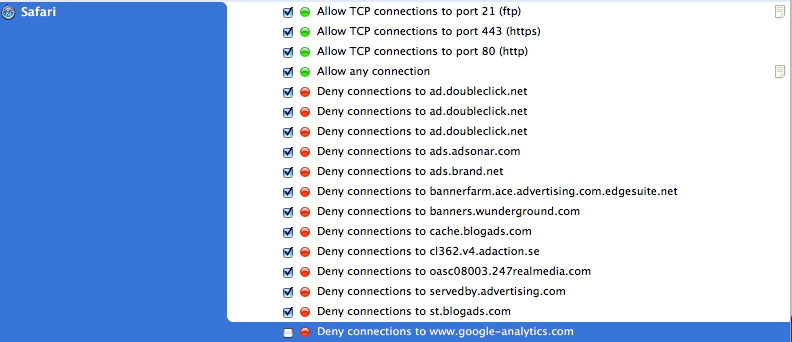
I habitually block outbound connections to tracking services like google-analytics.com. (I use Little Snitch for this.) Just because I don’t like them. Recently I noticed I often can’t connect to youtube.com, getting “server not found” errors. Amazingly, once I let google-analytics through again, everything works.

I haven’t verified exactly why this happens so I’m guessing the DNS for google-analytics resolves to at least some of the IP numbers for youtube, causing this to happen. Maybe not, maybe something else is happening.

But that’s not the important question. The thing that disturbs me more is if Google is intentionally making life difficult for people like me that don’t want excessive tracking of their surfing habits. Is that what is going on? Is it the start of a new and highly evil trend?

Little snitch rules for outbound filters